Remo Recover (Windows) is the best solution to recover your deleted or lost data in an easy way. Data lost due to emptying the Recycle Bin, formatting, corrupt partitions, accidental deletion using Shift + Delete keys, or due to any other reason can be recovered. With its friendly interface, even a non-tech-savvy user can recover data without any hindrances.
- Features
- Screenshots
- Whats new?
Recover from Where You Lost it with Preferred Location Recovery Support
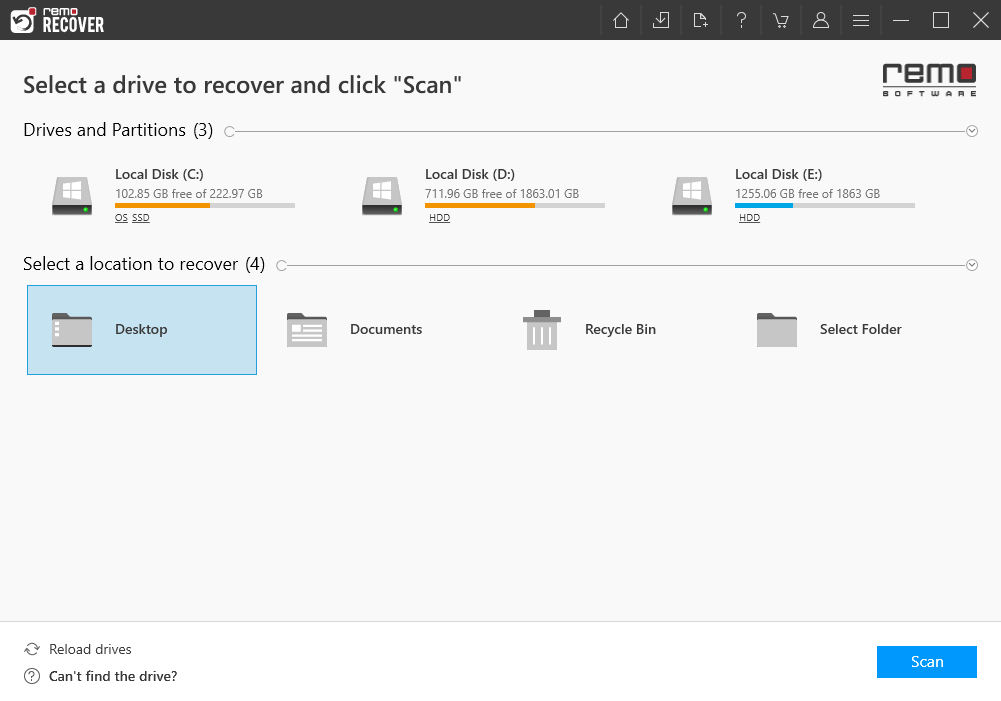
Specify from where you want to recover your data, be it from an external storage device or from any specific location like Recycle Bin or any folder of your choice, with Remo Recover you can recover data from anywhere. With Preferred location recovery support you will be able to easily restore the data you are looking for without having to search everywhere.
Whether you are novice user or a tech geek, data recovery experience with Remo Recover remains simple and engaging.
Recover as you Scan with Dynamic Data Recovery
No more waiting hours for the scanning process to complete! With Dynamic data recovery, you can start recovering your files as soon as you start the scanning process. With the help of Dynamic data recovery view you can look for the files you want to recover while the scan is in progress and even save it without interrupting the process.
Be it formatted partiton recovery or simple deleted file recovery, data recovery process is quick and engaging as the user can actively recover data without waiting for the scan to complete.
Accurately Locate Files with Smart A-I
Built with smart AI filters, you can find the file you are looking for quickly and smartly. Either you can simply use the search bar and type the file you are looking for and right click and locate the file which is buried deep inside or you can smartly use the folders created according to file type or property to find your way to the file.
For example, You can locate an MP3 file not only from its name but also with the help of its other file properties like name, genre, singer, etc. and this applies to any file type.
- Release notes were unavailable when this listing was updated.