If you provide IT technical service to your clients and need a powerful disk partition management toolkit, NIUBI Partition Editor Technician Edition is the best choice. This partition manager software is compatible with Windows Server 2016/2012/2008/2003 and Windows 10/8/7/Vista/XP. Local/removable hard disk, VMware, Hyper-V and all types of hardware RAID are all supported.
- Features
- Screenshots
- Whats new?
- Re-size Disk Partition: Shrink, extend, move and merge partitions to optimize space usage without losing data.
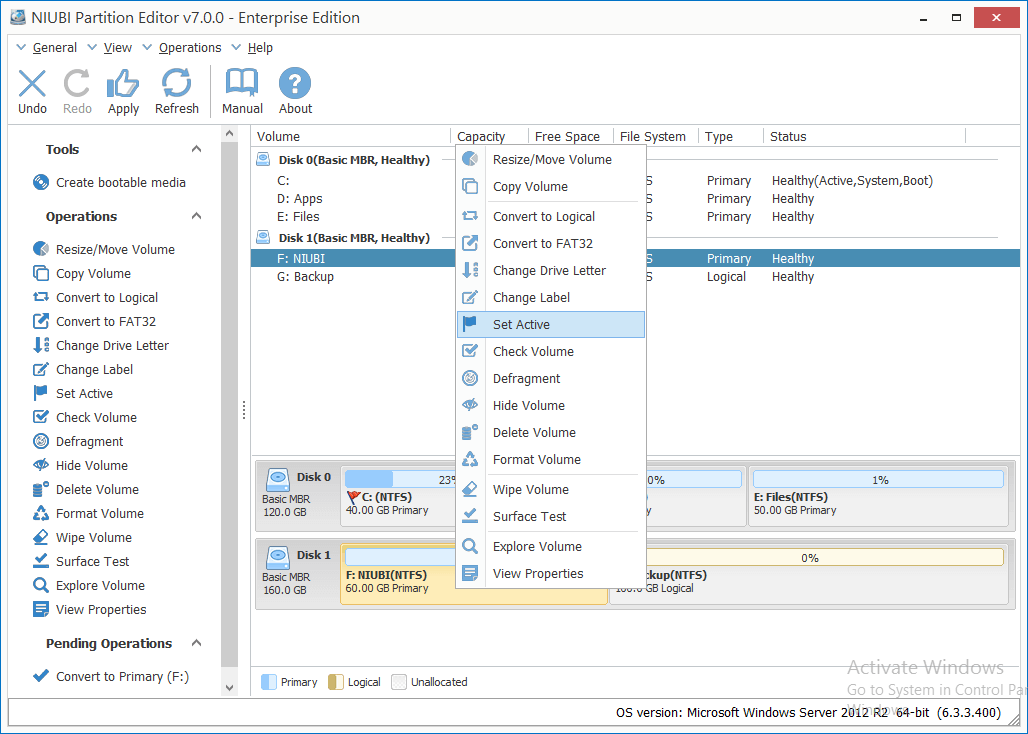
- Partition Management: Create, Delete, Format, Explorer partition, Change partition label and drive letter, Set Active partition, etc.
- Convert Disk Partition: Convert MBR disk to GPT, Convert Logical partition from/to Primary, Convert NTFS partition to FAT32.
- Clone & Migration: Migrate OS to new disk, clone entire disk or single partition to back up or migrate data.
- System Optimization: Partition defragment, Fix file system error, Scan bad sectors, Initialize disk, view disk/partition properties, etc.
- Data Security: Hide partition, Set disk read-only attribute, erase data in disk/partition/Unallocated space.
- 1 Second Rollback: Unique 1-Second Rollback technology to protect system and data, automatically reverts computer to original status in a flash if any software or hardware issue occur while modify disk partition.
- Extend Partition Online: Shrink and extend disk partition without rebooting. (Close running programs & files before starting this program.)
- Extremely Fast: Unique file-moving algorithm helps resize and move partition 30% to 300% faster than ANY other tools.
- All-in-One toolkit: Full featured optimization & management solution for both PCs and servers. Most of your disk partition maintenance requirements can be fulfilled.
- Virtual Mode: To avoid mistake, NIUBI is designed to work in virtual mode. The operations you do will be listed as pending, real disk partition won’t be modified until click Apply to confirm.
- Multiple Storage Supported: Internal/External hard disk drive, Hyper-V, VMware virtual disk, all types of Hardware RAID arrays and USB flash drives are all supported.
- Release notes were unavailable when this listing was updated.