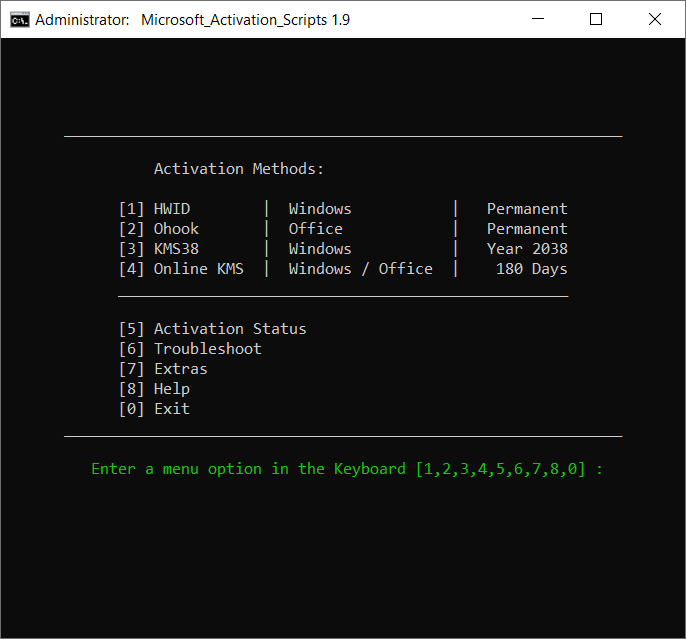
Microsoft Activation Script.cmd: Windows and Office Activator, Open Source and clean from Antivirus Detection. A Windows and Office activator using HWID / Ohook / KMS38 / Online KMS activation methods, with a focus on open-source code and fewer antivirus detections.
- System Requirements
- How to use it?
- Features
- Whats new?
Note: HWID Activation is not working, use KMS38 option for now HWID activation is not working because of server-side changes at Microsoft. Use the KMS38 option for now. Your previously established HWID is safe. This happened because of recent change to not allow Windows 7/8 free upgrades.
Method 1 – PowerShell (Recommended)
- On Windows 8.1/10/11, right-click on the Windows start menu and select PowerShell or Terminal (Not CMD).
- Copy-paste the below code and press enter
irm https://massgrave.dev/get | iex - You will see the activation options, and follow onscreen instructions.
- That’s all.
Method 2 – Traditional
- Download the file from here
- Right-click on the downloaded zip file and extract
- In the extracted folder, find the folder named All-In-One-Version
- Run the file named MAS_AIO.cmd
- You will see the activation options, and follow onscreen instructions.
- That’s all.
- KMS38 Activation
- Online KMS Activation
- $OEM$ Folders For Preactivation
- Activation Troubleshoot
- Insert Windows 10-11 HWID Key
- Change Windows 10-11-Server Edition
- Check Windows-Office Activation Status
- Available in All In One & Separate Files Version
- Fully Open Source
- Less antivirus detection’s
- Files are either transparent batch script or Official Microsoft file
HWID:
- Added info for activation not working issue.
- It’s not working because of server-side changes at Microsoft. Use the KMS38 option for now. Your previously established HWID is safe. This happened because of recent change to not allow Windows 7/8 free upgrades.
Ohook:
- Change the key preference for Office products in this order Retail:TB:Sub > Retail > OEM:NONSLP > Volume:MAK > Volume:GVLK
- Fixed a few bugs

Still working now?
the best tool for me💕