
ManicTime Pro will allow you to use automatically recorded past events to accurately track how you spend your time on your projects. With ManicTime, you’ll be able to monitor PC usage and track the most often-used applications.
- Features
- Screenshots
- Whats new?
- Auto-tracking of computer usage: Maritime sits in the background and records your activities, allowing you to focus on your work without being aware of its presence. When you are finished you can use collected data to accurately keep track of your time.
- Keep track of your work hours: After you have finished working, you can use MT to keep track of your hours. That means no more “punch-clock” like software, where you always forget to start or stop the clock. Just sit back and do your work. After you are finished, you can easily use collected data to accurately keep track of your time.
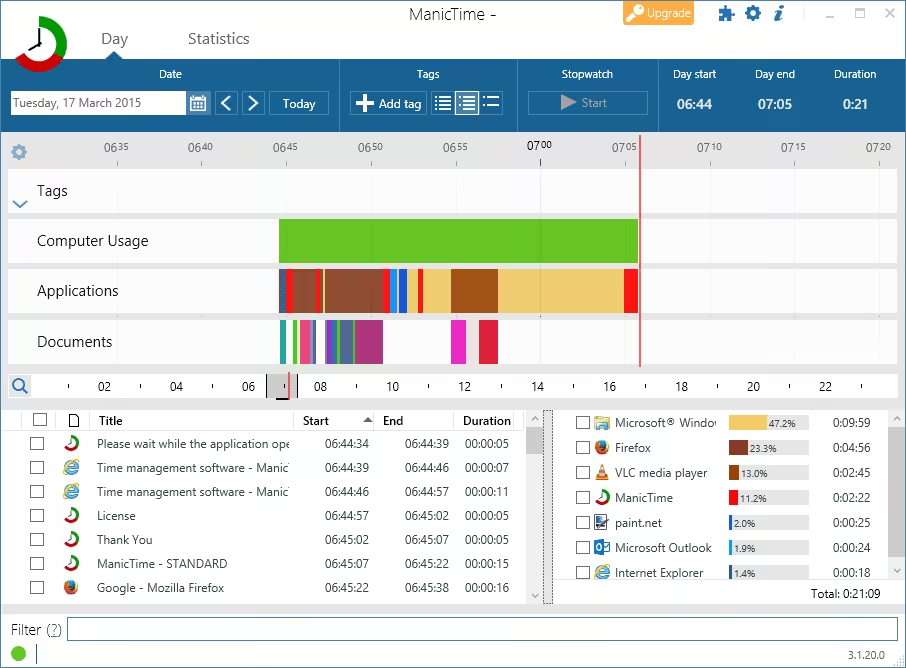
- Simple and intuitive UI: During the course of the day, the average user can switch back and forth between applications more than 1000 times, which means ManicTime gathers a lot of data. Using our timeline technology Manictime presents the data in an easy-to-understand way. You can drag on the timelines to select time or just mouse over to see hints about underlying data.
- Local storage: Gathered data can sometimes be sensitive and you don’t want it sent over the wire and shared. That is why all the data Manictime gathers is stored locally on your computer and you can delete it any time you want. Having a local database also enables you to use ManicTime offline, without an Internet connection.
- Powerful statistics: See which applications you use the most or on which websites you spend the most time. Also easily figure out how much time you spent working on projects to accurately bill your clients or just keep track of your work.
- While Advanced search is running, tagging is disabled
- Tags from the server now sync with other timelines
- Bug fixes
- Jira plugin fixes
- Zoom plugin fixes






thanks for the update
x64 confirmed works with 2026.1.0.5
This is for x86 only the x64 is not working properly
Default Installation
1 Install Manictime
2 Stop the Manictime process
3 Copy the crack to the installation folder
4 Run Manictime
Installation with restore backup
1 – Install ManicTime Cracked
2 – launch the Manictime after installed
3 – There is a 3 to choose and choose the – > Let’s get started choose -> Use Manictime on this machine only
4 – Select the Professional(Trial) 30 days -> click next and ok.
5 – In the manictime application select the setting icon on the top right corner
6 – choose -> Backup and restore and click [Restore]
7 – Select the Backup folder the one you backup in manictime the Zip folder or the [ManicTimeCore] named file -> Select and OK and close after Data Restored Successfully
8 – The Manictime will restart and will appear the Professional Trial(30) days again -> Select OK and exit the APP
9 – Make sure it is not running in the background or exit it on the background icons
10 – Copy the Madara crack filed named -> [Lib] copy this file and go to the x86 in the program files(x86) and find
manictime(it’s up to you where you installed the app find the folder ManicTime)
11 – Open the manictime folder and paste the lib and replaced it when ask to replace
12 – go to the Local C -> users -> chris(your user name) -> local -> share -> manictime and you will see the
[.xt8qqt1ry9ag] file and you must [delete] this or else it will not work and will be messed up the app.
13 – OPEN THE MANICTIME then DONE the backup is restored happy tracking 🙂
14 – if ever you uninstalled or the app is crashed or whatever what happen to your computer make sure go to -> Local C -> users -> chris(your user name) -> local -> share -> manictime and you will see the
[.xt8qqt1ry9ag] or anything like this you must delete IT!! before installing the app again!!
A new version has been released. Could it be updated?
if you restore from old database,then the crack effect lost